
Payday Loan Affiliate Plugin Released
Start generating premium financial leads on your WordPress site and earn high payouts on every valid submission. Follow this guide to set up the plugin.
Download the Latest Release
Version 1.0.0 is fully compatible with WordPress 5.x+ and PHP 7.4/8.0+.
📥 Download Payday Loan Plugin (.zip)Installation & Setup Instructions
Get Your Publisher API Key
First, register for a free publisher account on the AffiliatePartners.biz Network. Once logged in, register your target website under your publisher dashboard. Navigate to your website details tab to view and copy your Unique API Key.

Upload and Activate the Plugin
Extract the downloaded plugin archive into your WordPress site directory at /wp-content/plugins/, or upload the zip file directly via the WordPress Admin interface (Plugins -> Add New -> Upload Plugin).
Click Activate Plugin to enable the core lead generation services.

Configure Dual-Form Integration
The plugin is built with a dual-form design to maximize conversions:
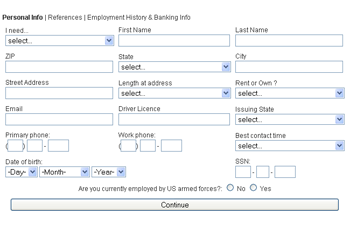
- Large Multi-Step Form: Place the shortcode
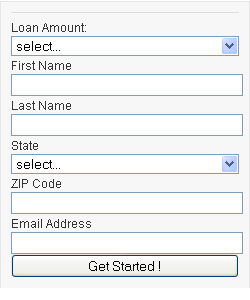
[leads_form]on a dedicated, secure landing page (e.g.,/apply-now). - Small Widget Form: Add the small 5-field form to your sidebar using widgets, or place the shortcode
[leads_smallform]on blogs. When clicked, visitors are redirected to the large form with details pre-filled.
Save API Settings
In your WordPress Dashboard, navigate to Settings -> Payday Loan Affiliate.
Input your Website Unique Key copied from the publisher network, and paste the absolute URL of the page containing the large form shortcode under the Large Form URL setting. Save your settings.
Test & Go Live
Load your application page in an incognito window. Ensure the forms render correctly. Submit a test lead to verify the API connectivity. All lead submissions are validated in real-time, and metrics will be updated instantly on your Affiliate Partners portal.
 WinWinHost News & Tutorials
 Need Help?
 (818) 903-2338
 Email Us